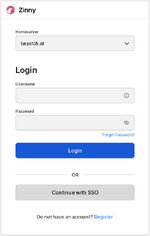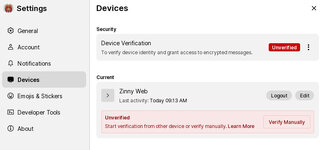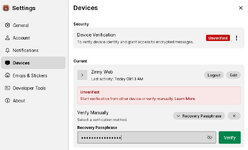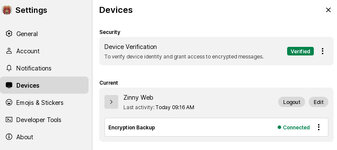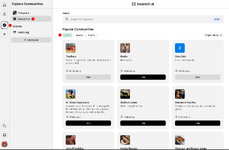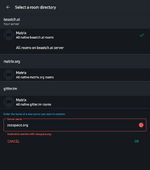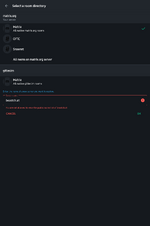
Beastch.at is open (Read the 1st post for howto)

I see this stupidity hasn't been resolved since then.
This may be how the matrix protocol works. The same thing happens in simplex and that is because you are not there to decrypt it on that session and only you have the key so nobody else can read it.
It may be inconvenient, but it is secure.

Lmao, only for those who can't figure it out 😆
Can you explain it then?
Because I have not tested it enough across different clients to know exactly how this works.

Lmao, only for those who can't figure it out 😆
From my observation in Zinny only messages sent on that session get decrypted if you put in the recovery password, not any newer messages. On element I kinda think it decrypts even newer messages.
 
Last edited:
This may be how the matrix protocol works.
I know, but it didn't work for me even when I was logged in, and that's a bug.
I was interested in the exclusive zoofile room, but if I wrote a greeting, I got a reply right away, but it still couldn't encrypt. Maybe it would have worked with a different client, but I got bored quickly.

The biggest reason that ZV doesn't have a Telegram group is that the Telegram policy prohibits zoo, so a group the size of Beast Chat would be deleted every week. meh
 
Can you explain it then?
Because I have not tested it enough across different clients to know exactly how this works.
I could try but I don't have that issue. I logged in from the desktop client. Entered my recovery key, and can see all messages just fine. On mobile I've had similar issues. One issue was from not verifying. Even after verifying, I then had to select "unlock encrypted messages history" by long pressing on the encrypted message(s).
Screenshot_20260831_114615_Element Classic.pngScreenshot_20260831_114623_Element Classic.pngScreenshot_20260831_114707_Element Classic.pngScreenshot_20260831_114725_Element Classic.pngScreenshot_20260831_114731_Element Classic.png
 
That's my best bet. There are just too many clients for it to work the same without issue. Even Element classic, Element x, schlidichat, fluffychat have some mild-to-big differences.
 
The ability to read messages sent while you were not online.
Element works like any other client, change the sever name and log in, set up recovery password.
I followed the instructions in the OP to the letter, including using the recovery passphrase.

I log in via https://element.beastch.at/#/login. After typing my own password, I get this screen:

1788212339948.png

I click on continue, and enter my recovery passphrase. I then get the notification on my screen that my account has been verified:

1788212526385.png

Clicking on Done, I enter Element itself, where I am greeted with the following message:

1788212640437.png

Followed by:
1788212673838.png

And this shows up any time, regardless of whether I update my browser.

And I still cannot see messages that were posted while I was offline:
1788212790740.png

So yeah, what am I doing wrong here?
 
Umm. Browser not supported message...twice. Gonna say try it in a different browser 🤷‍♂️

That or search github for similar issues with your browser

Searched and found

"Element now uses a service worker to handle authenticated Matrix media—particularly when the homeserver requires authentication for media downloads. Element's own issue tracker documents this problem specifically with Firefox-based browsers, including Tor Browser."

"Technically, you may find instructions telling you to go to:
about:config
and change:
dom.serviceWorkers.enabled
to true.
I don't recommend doing that in Tor Browser.
The Tor Project specifically warns that modifying Tor Browser's privacy-related configuration can compromise its intended protections, and changing the browser's private-browsing behavior can also affect fingerprinting protections."
 
Last edited:
Option 1 — Use a different browser through Tor

You can run a normal browser whose traffic is routed through the Tor SOCKS proxy.
That allows Service Workers to function while the network connection goes through Tor.
But there is an important distinction: this gives you Tor's network routing, not all of Tor Browser's anti-fingerprinting protections. The Tor Project specifically notes that Tor Browser is designed to hide not only your IP but also characteristics that can contribute to browser/device fingerprinting.


Option 2 — Use Element's desktop client over Tor

Element Desktop isn't a web browser, so the Tor Browser Service Worker restriction doesn't apply in the same way.
There has historically been support for launching Element Desktop with a SOCKS5 proxy, including:
--proxy-server=socks5://127.0.0.1:9050
Element's own issue tracker documents this method.

If you're using the Tor Browser Bundle, its Tor SOCKS listener is commonly on a different port (often 9150), whereas a standalone Tor service commonly uses 9050. The exact port depends on how Tor is running.

 
Last edited:
I was able to access the chat via Zinny, using TOR. Registration and verification was all fine, I got the verification code and I can chat.

However, there are two things not going so great for me.

1. I cannot see whether anybody on the members list of a room / group is online. Is there a way - like in the previous chat - to see who is online and who isn't, without having to click on their names?

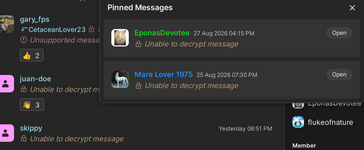
2. With some rooms, their pinned messages, and with DM, I can only read the chat messages if they are posted while I am online. If somebody posts something while I am offline, I get the message that is not possible to decrypt them (see screen shot). Is there any way for me to decrypt these messages (or change the settings so this doesn't happen again)?

View attachment 812003
I assume you made sure the encryption stuff was set? That way when you login it should have you put in your passphrase or whatever and it should load them. Also might want to make sure unverified devices are logged out just in case

Edit. After seeing the next page. This post was pointless lol
 
Lol, well, I just quoted a bunch of stuff I read, so who knows how true and accurate it all is. I don't use TOR and I'm not deep diving into IT issues for "fun"
 
I still have these same issues, and am not confident enough to tinker around in the configurations of TOR. I even wouldn't know what to do because a lot of the advice given is full of jargon. Thing here is: even when the manual does actually mirror what I see on my screen, and even if I follow it to the letter, it still doesn't resolve the issue.

In short, these failing-to-decrypt-issues have been going on for years, and I don't expect them to be resolved. Unless of course somebody can go over it step-by-step in language that a non-IT-expert can understand.
 
I still have these same issues, and am not confident enough to tinker around in the configurations of TOR. I even wouldn't know what to do because a lot of the advice given is full of jargon. Thing here is: even when the manual does actually mirror what I see on my screen, and even if I follow it to the letter, it still doesn't resolve the issue.

In short, these failing-to-decrypt-issues have been going on for years, and I don't expect them to be resolved. Unless of course somebody can go over it step-by-step in language that a non-IT-expert can understand.
The manual is for Zinny/Cinny and there the problems exist no matter what you do. If you use Element, it will behave different.

I will make an element tutorial at some point but without registration because I already have an account.
 
Option 1 — Use a different browser through Tor

You can run a normal browser whose traffic is routed through the Tor SOCKS proxy.
That allows Service Workers to function while the network connection goes through Tor.
But there is an important distinction: this gives you Tor's network routing, not all of Tor Browser's anti-fingerprinting protections. The Tor Project specifically notes that Tor Browser is designed to hide not only your IP but also characteristics that can contribute to browser/device fingerprinting.


Option 2 — Use Element's desktop client over Tor

Element Desktop isn't a web browser, so the Tor Browser Service Worker restriction doesn't apply in the same way.
There has historically been support for launching Element Desktop with a SOCKS5 proxy, including:
--proxy-server=socks5://127.0.0.1:9050
Element's own issue tracker documents this method.

If you're using the Tor Browser Bundle, its Tor SOCKS listener is commonly on a different port (often 9150), whereas a standalone Tor service commonly uses 9050. The exact port depends on how Tor is running.

There is a problem with this that when you log in in the element desktop app, it will open a browser and ask you to log in on an auth page even if you use --proxy-server=socks5://127.0.0.1:9150
So that way you would connect to beast chat over your regular browser at least for login anyway. It is a stupid feature, it should let you log in in the desktop app without the need to open a browser and send a confirmation back to the app that you logged in.
Cinny can do this in the browser app, element should implement this too, the login process is inconvenient even when you are not trying to hide your ip.

Thanks. So basically I damned if I use zinny, and damned if I use Element?
Element should work normally.
 
Here, Element works, but (before and after chat went down), in some rooms I cannot read messages that are posted when I'm offline. All I get in Element is that those messages cannot be decrypted. Has been like that for years.
 
Here, Element works, but (before and after chat went down), in some rooms I cannot read messages that are posted when I'm offline. All I get in Element is that those messages cannot be decrypted. Has been like that for years.
Even with element you have to be online. You can try leaving one session behind not logged out if that helps decrypt messages sent while you were offline.
 
There is a problem with this that when you log in in the element desktop app, it will open a browser and ask you to log in on an auth page even if you use --proxy-server=socks5://127.0.0.1:9150
So that way you would connect to beast chat over your regular browser at least for login anyway. It is a stupid feature, it should let you log in in the desktop app without the need to open a browser and send a confirmation back to the app that you logged in.
Cinny can do this in the browser app, element should implement this too, the login process is inconvenient even when you are not trying to hide your ip.
Well, the other other thing I know is from someone way more knowledgeable than I, especially concerning TOR, but most things computer network related.

"It's a more nerdy option and no idea if it's even an option for pure windows or mac users, but when I use tor I typically set it up as a transparent proxy and use a packet filter to rewrite all outbound traffic through the tor transproxy.

That way stuff that isn't socks aware or doesn't respect proxy settings still work."

Not sure if it helps but also done with this for a bit. I'm slammed at work and have a shit ton of thinks to do before my upcoming vacation. Good luck 👋
 
  • Like
Reactions: pes
I had to create a brand new login account and "start over" to make it work for me. I was also getting the "cannot decrypt" message on all posts in DM's. It's so secure "I" can't even see my messages :P
 
I think someone had a problem with gifs. Element has a switch in the settings to auto play gifs.
 
Even with element you have to be online. You can try leaving one session behind not logged out if that helps decrypt messages sent while you were offline.
That doesn't help me. I have been leaving a session without pressing "log out", and still I cannot decrypt messages. Not even my own.
 
That doesn't help me. I have been leaving a session without pressing "log out", and still I cannot decrypt messages. Not even my own.
As I understand it you can decrypt messages from sessions you have verified by putting the recovery password in when you log in.
You can not decrypt those sent by unverified devices.
When you are offline people send messages that do not match any of your sessions, so you can not decrypt them.
Some clients can re-request keys for the older messages when you log in, some can not so that is why you can not decrypt it.

1. solution to this is using a client that can do this. Which is probably element X.
2. solution is to have one session always logged in on for example a computer that will always receive messages and any second device will request those from your own first session.
3. solution is to not log out of the session on you device. If you just turn the wifi off, it will reconnect and re-synchronize.
 
Back
Top