
Our new beastch.at Matrix homeserver is now open, this replaces the old beast.chat server. The server is entirely new, you will need to register a new account. Your old Beast.chat username & password will not work.
For reporting issues contact: @SloppyTac0
If you can not get the verification code, check your spam filter first.
We've brought back a few rooms that existed on Beast.chat. New room creation is disabled for all normal users for moderation purposes. If you would like to request a room be created, just message a moderator in Talk to ZV mods or The Barn room and they should be able to do that for you.
Chat rules:
The chat is a matrix server which you can use with a variety of matrix clients working on desktop or mobile:
 Choose one that you like such as Element.
TOR browser compatible clients:
Zinny https://chat.zoospace.org/ also works with media.
Cinny https://app.cinny.in/ has problems with images.
Go through your client's settings one by one and have a look at what it offers. Such as autoplay gifs or showing extra messages.
The following is shown using the client https://chat.zoospace.org/ which is similar to Cinny.
Register and account:
1. Change the Homeserver on line 1 to beastch.at
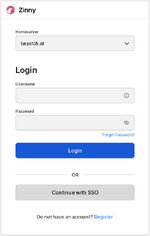
2. Click register at the bottom.
3. Continue with SSO and follow the instructions on screen.
Log in:
1. Open the client of your liking and change the Homeserver to beastch.at
2. Put in your login details and log in.
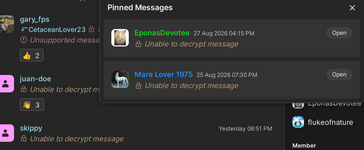
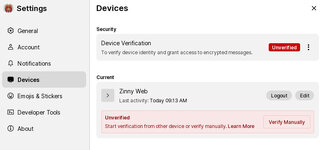
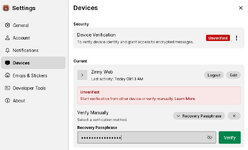
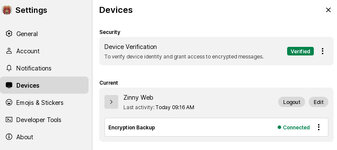
3. Device verification. (This step is done differently on different clients. Some ask for it immediately, some have it in settings.) This is required to recover old encrypted messages on other devices you log in on. You will need to set up a recovery password during this process.
Browsing rooms:
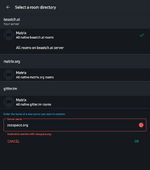
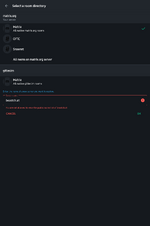
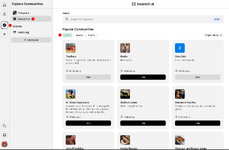
Each client has a dedicated search/browse button. If you are using one that has more than one sever configured, you might need to select the sever you want to browse.
For reporting issues contact: @SloppyTac0
If you can not get the verification code, check your spam filter first.
We've brought back a few rooms that existed on Beast.chat. New room creation is disabled for all normal users for moderation purposes. If you would like to request a room be created, just message a moderator in Talk to ZV mods or The Barn room and they should be able to do that for you.
Chat rules:
- Respect and Courtesy: Treat all members with respect and courtesy. Controversial topics such as politics should be avoided unless agreed upon by all participants.
- No Stalking: Do not stalk or harass any members. Respect their boundaries and privacy.
- Private Messages (PMs): Always ask before sending a PM. Members have the right to ignore PMs, and requests can be rejected. If a member does not want unsolicited PMs, end the discussion respectfully.
- Ignoring Users: You can ignore other users by clicking on their name and selecting "ignore."
- Profile Photos: No dick pick avatars or other genitalia are allowed unless they feature animals or are artistic representations. Profiles with inappropriate avatars will be requested to change them, or have the image deleted; Multiple violations will result in account restrictions, or ban.
- Room Creation: New room creation is disabled for all normal users for moderation purposes. If you would like to request a room be created, just message a moderator in #TheBarn that is also a regular ZV moderator and they should be able to do that for you.
- Room Content: Rooms containing content that violates the rules of the chat or zooville can be removed. This includes no scat or necro channels. Ensure that media in your room follows the rules and does not contain illegal content.
- Encryption: Set up encryption through the privacy settings of your account to decrypt your chats on other devices.
- Password Resets: To get password resets, contact the administrator with the subject line "Password reset." OR if you have added an email to your account, click on Reset password and type in your email.
- Media Rooms: Media rooms are primarily for sharing and discussing media content. While simple chatting is discouraged, discussions relating to posted media and requests are encouraged. Use the dedicated "Files" section in the app/web platform to browse uploaded files conveniently.
- Illegal Content: Posting of CP content will result in the removal of your messages and account deactivation from both the chat and the forum. If illegal content is reported in DMs, you will be removed.
- No Hentai: Hentai is not allowed on the platform.
The chat is a matrix server which you can use with a variety of matrix clients working on desktop or mobile:

TOR browser compatible clients:
Zinny https://chat.zoospace.org/ also works with media.
Cinny https://app.cinny.in/ has problems with images.
Go through your client's settings one by one and have a look at what it offers. Such as autoplay gifs or showing extra messages.
The following is shown using the client https://chat.zoospace.org/ which is similar to Cinny.
Register and account:
1. Change the Homeserver on line 1 to beastch.at
2. Click register at the bottom.
3. Continue with SSO and follow the instructions on screen.
Log in:
1. Open the client of your liking and change the Homeserver to beastch.at
2. Put in your login details and log in.
3. Device verification. (This step is done differently on different clients. Some ask for it immediately, some have it in settings.) This is required to recover old encrypted messages on other devices you log in on. You will need to set up a recovery password during this process.
Browsing rooms:
Each client has a dedicated search/browse button. If you are using one that has more than one sever configured, you might need to select the sever you want to browse.